Mobility

How to use Voice and Video over LTE

What you'll need

Voice and Video over LTE (VoLTE and ViLTE) allows you to make voice and video calls over the LTE network. It enables faster call setup times, improved voice quality when calling another VoLTE/ViLTE-capable device, simultaneous use of voice and LTE data, and the ability to switch between video and voice during calls.

Voice and Video over LTE is used automatically if you are eligible. To see if Voice and Video over LTE is working, just look for the “LTE” icon-new on the status bar during a call.

To take advantage of this service, you must have:

  • A compatible device
  • An eligible rate plan with data and an LTE or 5G SIM card
    At this time, personal and corporate monthly plans (postpaid plans) are eligible for both VoLTE and ViLTE. Prepaid plans are eligible for VoLTE only.
  • Voice and Video over LTE network coverage
Make a voice call over LTE

Voice calls are made exactly the same way as you would make a call today. Since Voice over LTE is activated by default, all you need to do is place a call while in the applicable coverage area.

Important: when calling 9-1-1, do not add * or # before the number.

For details about voice and data charges, see the "Pricing" section below.

Make a video call over LTE

If you are on an eligible postpaid plan, video calls are made by selecting the video call icon found in the phone’s dial pad, call logs and address book. video icon

At this time, video calling is only available between qualifying Bell postpaid customers. Both you and the recipient must have a compatible smartphone and a monthly (postpaid) plan, and be within the Voice and Video over LTE coverage area.

Video calling available

Video calling available

Video calling not available

Video calling not available

For details about voice and data charges, see the "Pricing" section below.

Note: Video over LTE is not supported on some devices.

Switch from voice to video during a call

If you are eligible, in the voice call screen, simply select the video call icon (if available) to switch over to video.
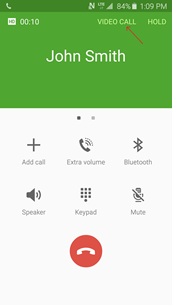
voice call screen
Switch from video to voice during a call

During a video call, select the highlighted video camera icon. This will bring up options including the ability to end the video call, switch to voice, or cancel (close the menu).
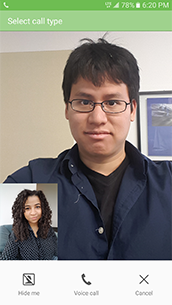
Switch from video
Receive a video call

During an incoming video call, you have the option to accept the video call, accept the call with voice only, or reject the call.
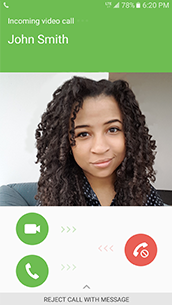
Receive a video call
Enable or disable Voice and Video over LTE

Voice and Video over LTE is enabled by default.

To disable it, go to the phone dial pad and select More > Settings > Voice over LTE > Do not allow VoLTE calls. This will also disable video calling.

Enable or disable Voice and Video

Apple iOS

iOS 14 and higher

iPhones running on iOS 14 or higher will automatically connect to LTE and will enable VoLTE by default.

iOS 13 and older

iPhones running on iOS 13 or older will need to have VoLTE enabled. To do so:

  1. Go to Settings.
  2. Select Cellular.
  3. Select Cellular Data Options.
  4. Select Voice & Data.
  5. Select LTE, VoLTE ON.

Android OS

Android 11 and higher

Devices running on Android 11 or higher will automatically connect to LTE and will enable VoLTE by default.

Android 10 and older

Devices running on Android 10 or older will need to have VoLTE enabled. To do so:

  1. Go to Settings.
  2. Select Connections.
  3. Select Mobile networks.
  4. Select VoLTE calls and turn it on.

Can I access VoLTE outside of Canada ?

VoLTE roaming is available on select devices with a monthly (postpaid) plan. Coverage is available in the U.S. (including Puerto Rico and the U.S. Virgin Islands) and several international destinations. For more details, see the information on VoLTE roaming below.

At this time, VoLTE is not available for Bell Prepaid plans outside of Canada.

Can I make video calls over a Wi-Fi connection?

No. Video calling on Android smartphones will only work over a mobile network connection, even if your smartphone is connected to Wi-Fi.

Bell Prepaid plans are not eligible for Video over LTE or Wi-Fi at this time.

Is Voice and Video over LTE available in my area?

Voice and Video over LTE is in all areas where LTE coverage is available. See the coverage map.

Will I be charged differently for voice calls over LTE?

No, you will not be charged differently for voice calls. Charges remain the same as before. Voice usage will be deducted from the minutes available in your rate plan or, if applicable, charged at pay-per-use out-of-bundle rates. Long distance charges may apply.

There are no data charges for Voice over LTE (VoLTE).

Will I be charged for data usage for video calls over LTE?

Yes, data used for video calls will be charged at standard data rates (from data included in your rate plan or add-on, or at pay-per-use data rates as applicable). A video call uses approximately 6 MB of data per minute.

Voice minutes used while on a video call will be deducted from the monthly allotment provided in your rate plan or, if applicable, charged at pay-per-use out-of-bundle rates.

Voice and Video over LTE (VoLTE and ViLTE) roaming is available on select devices with a monthly (postpaid) plan. Coverage is available in the U.S. (including Puerto Rico and the U.S. Virgin Islands) and several international destinations.

At this time, Bell Prepaid plans are not eligible for VoLTE roaming outside of Canada.

Roaming pricing

  • Voice over LTE: standard voice roaming rates apply.
    • On your bill, these calls will be identified with the 3-digit code of the country where you roamed and the call type will be "VoLTE."
  • Video over LTE: standard voice roaming and data roaming rates apply
    • On your bill, these calls will be identified with the 3-digit code of the country where you roamed and the call type will be "VoLTE."

Important: To take advantage of this service, make sure your device has the latest software. Select your device and follow instructions related to updating software

See if your device is capable of VoLTE/ViLTE roaming

Compatible devices

  • iPhone 6 and all newer models (including SE)
  • Watch Series 3 and all newer models

*Video over LTE (ViLTE) is not supported on this device.

Must be operating on iOS 13 or higher

Appareils compatibles

  • ahlo 1

*Video over LTE (ViLTE) is not supported on this device.

Must be operating on Android 11 or later

Compatible devices

  • Alcatel 1B*, 1X*

*Video over LTE (ViLTE) is not supported on this device.

Must be operating on Android 11 or later

Compatible devices

  • Pixel 2, Pixel 2 XL
  • Pixel 3, Pixel 3 XL
  • Pixel 3a, Pixel 3a XL
  • Pixel 4 and all newer models

*Video over LTE (ViLTE) is not supported on this device.

Must be operating on Android 10 or later

Compatible devices

  • P30 series
  • P40 series

*Video over LTE (ViLTE) is not supported on this device.

Must be operating on Android 11 or later

Compatible devices

  • G5, G6, G7ThinQ, G8ThinQ, G8XThinQ, G7 One*
  • K20*, K30*, K31, K32*, K41S, K61
  • Q6, Q60, Q70, Q Stylo+
  • Stylo 3 Plus
  • V30, V60 ThinQ 5G
  • Velvet 5G
  • X Power 2, X Power 3

*Video over LTE (ViLTE) is not supported on this device.

Must be operating on Android 10 or later

Compatible devices

  • Moto Edge (2022 and all newer models)
  • Moto Edge+
  • Moto E5 Play
  • Moto G Fast
  • Moto G Power (2020, 2022)
  • Moto G Pure
  • Moto G (2025 and all newer models)
  • Moto G 5G (2022 and all newer models)
  • Moto G Stylus 5G
  • Moto G6 Play*
  • Moto G7 Play
  • Moto One 5G Ace
  • Moto One Hyper
  • Moto One Vision
  • Moto Moto E
  • Moto E6
  • Moto Z3 Play
  • Moto razr+
  • Moto razr 2025

*Video over LTE (ViLTE) is not supported on this device.

Must be operating on Android 11 or later

Compatible devices

  • Galaxy S6 and all newer models
  • Galaxy Note8 and all newer models
  • Galaxy Xcover 4, XCover Pro, XCover6 Pro, XCover7 Pro
  • Galaxy A03s, A5 (2017), A8, A10e, A11, A12, A13, A14 5G, A15 5G, A16 5G, A20, A21, A32 5G, A35, A36, A50, A51, A52 5G, A53, A54, A70, A71
  • Galaxy J3, J3 Prime, J3 (2018)
  • Galaxy Z Flip 5G, Galaxy Z Flip3 5G and all newer models
  • Galaxy Z Fold 5G, Galaxy Z Fold 3 5G and all newer models
  • Galaxy watch Active2*, Samsung Galaxy watch 4 and all newer models*

*Video over LTE (ViLTE) is not supported on this device.

Must be operating on Android 10 or later

Compatible devices

  • XP3
  • XP5s
  • XP8
  • XP10
  • XP Pro
  • XP3 Plus 5G*

*Video over LTE (ViLTE) is not supported on this device.

Compatible devices

  • Xperia X Performance
  • Xperia XZ1, XZ2

Must be operating on Android 11 or later

Compatible devices

  • TCL 10L, TCL 10 Pro, TCL 20S, TCL 20 Pro 5G, TCL 30 5G, TCL 30 XE 5G, TCL 303*, TCL 40 XE 5G, TCL 50 XE 5G, Flip*, TCL 60 XE 5G

*Video over LTE (ViLTE) is not supported on this device.

Must be operating on Android 11 or later

Compatible devices

  • Blade A3 L*
  • Blade A3+*
  • Blade A7P*
  • Cymbal 2 (2022)*
  • Nubia A76*

*Video over LTE (ViLTE) is not supported on this device.

Must be operating on Android 11 or later