Bell MTS - Installing or replacing your Motorola VIP2102 set-top box
Ce service est offert uniquement aux clients de MTS au Manitoba. Afin d’obtenir le soutien relatif à votre région, veuillez sélectionner votre province.
Front Panel Lights/Function for VIP2102
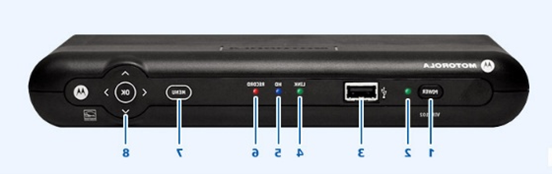
| Key | Item | Function |
|---|---|---|
| 1 | POWER Switch |
|
| 2 | POWER LED | Green: Power is on |
| 3 | USB | USB 2.0 port (Not compatible with Bell MTS service). |
| 4 | LINK | Green: Connected to the Bell MTS TV network. |
| 5 | HD | Blue: Set-top box is receiving an HD signal. |
| 6 | RECORD | Red: PVR is recording one or more shows. |
| 7 | MENU | Displays the on-screen menu. |
| 8 | UP/DOWN/LEFT/RIGHT/OK |
|
Rear Panel Function for VIP2102
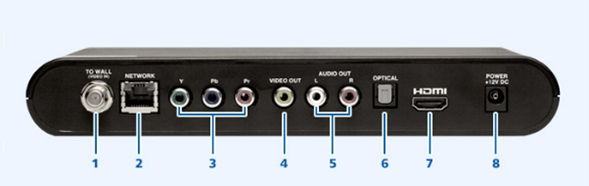
| Key | Item | Function |
|---|---|---|
| 1 | TO WALL (VIDEO IN) | Coaxial input from the 2Wire or Pace Residential Gateway to the set-top box. |
| 2 | NETWORK | Ethernet 10/100 Base-T RJ-45 port. |
| 3 | Y PB PR | RCA-type component video outputs to an HD-TV or home theatre receiver. It carries video only; you must also connect to the TV or home theatre receiver for audio. |
| 4 | VIDEO OUT | RCA-type, standard-quality video output (to a TV, VCR, DVD recorder, or other device). It carries video only; you must also connect to the TV or home theatre receiver for audio. |
| 5 | AUDIO OUT L & R | Stereo audio outputs (Left and right RCA-type). |
| 6 | OPTICAL | S/PDIF output. High-quality digital audio output (to a digital home theatre receiver). |
| 7 | HDMI | High-Definition output. Connects to an HD-TV or home theatre received with an HDMI input. |
| 8 | POWER | DC power adapter connector. |
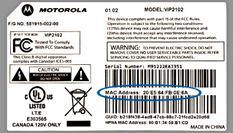
Finding the MAC Address of VIP2102
You can find the MAC address on a sticker on the bottom of the unit.
How to replace your VIP2102 set-top box with a VIP2102 set-top box
-
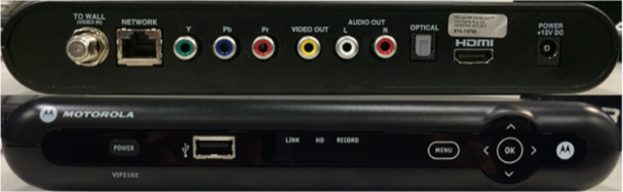
Disconnect all cables from your current set-top box and connect them to the corresponding connections on your new set-top box. If you have a coaxial connection, a wrench or pliers might be required to loosen the coaxial cable.
- If you have a USB device plugged into the front of the set-top box for your RF remote, ensure that you transfer it over to the new set-top box.
-
Note: Do not plug in the old power adapter to the new
set-top box.
Images may not be exactly as shown
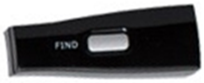
RF USB Receiver
Images may not be exactly as shown
-
Once you have connected the set-top box to a power outlet, the lights on the front of the set-top box flash. The set-top box will take several minutes to load up.
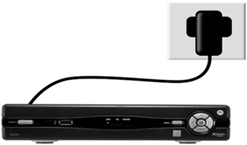
Images may not be exactly as shown
- Ensure your TV is set to the correct input (HDMI1, HDMI2, Video1, etc.)
- The Fibe TV logo will appear on your TV screen when it is ready for use. Press SELECT or OK to watch TV.
How to replace your VIP1200 set-top box with a VIP2102 set-top box
Disconnect all cables from your current set-top box and connect them to the corresponding connections on your new set-top box.
- If you have a USB device plugged into the front of the set-top box for your RF remote, ensure that you transfer it over to the new set-top box.
- Note:s Do not plug in the old power adapter to the new set-top box.
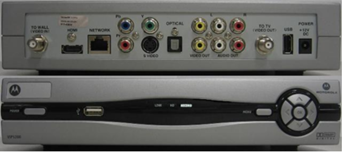
VIP1200
Images may not be exactly as shown
VIP2100
Images may not be exactly as shown
RF USB Receiver
Images may not be exactly as shown